
Technology / SaaS
Where this process begins.
Something is not working, but support lacks the details it needs to act. The team needs to know the company, the type of problem, what happened, how urgent it is, and where in the system it occurs. Without this context, every ticket requires more questions before troubleshooting can begin.
For software companies that need to organize and prioritize support tickets across channels.
Process map
From the initial need to the team’s next step.
- A need arisesThe person needs to start a request or report what happened.
- Initial messageThe customer reports a technical issue.
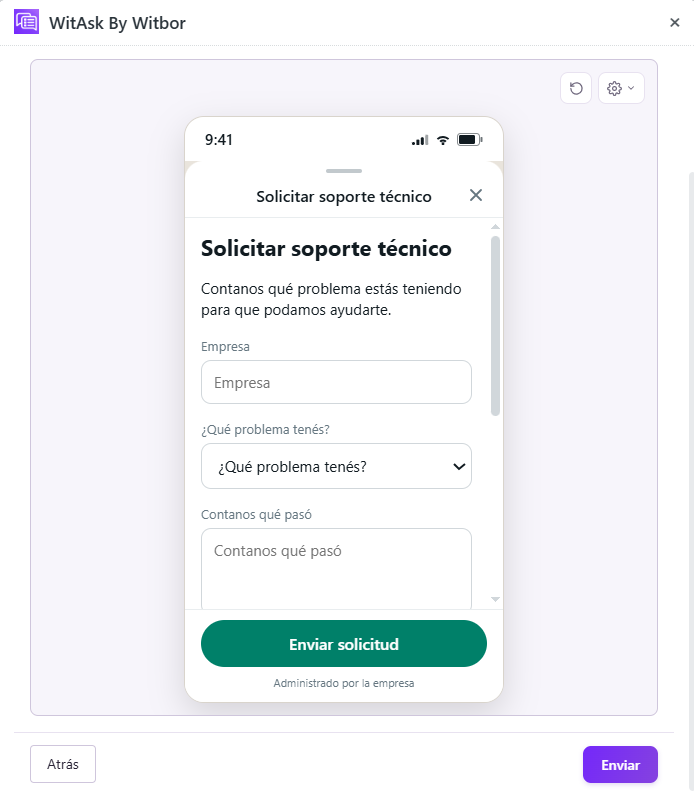
- Guided questionsWitAsk uses a WhatsApp Flow to collect the company, issue type, description, urgency, and where the error occurs.
- Ticket prioritizationThe details arrive in Zendesk already structured, so the support team can review the ticket and assign it by urgency.
Industry details
What the team needs to know.
Company and type of problem.
Description of the issue.
Priority and where the problem occurs.
Case follow-up
The information arrives ready for action.
A reported problem becomes a support ticket ready to prioritize. The answers are gathered so the responsible team can review the case and decide what to do next.
The fields and next step depend on the provider's configuration.
Other situations
Ways to adapt the workflow.
Prioritize according to the customer's plan.
Link previous tickets from the same account.
Request a screenshot or video of the error.
Featured case in action
An example of the complete workflow.
- Initial message
The customer reports a technical issue.
- Guided questions
WitAsk uses a WhatsApp Flow to collect the company, issue type, description, urgency, and where the error occurs.
- Ticket prioritization
The details arrive in Zendesk already structured, so the support team can review the ticket and assign it by urgency.
- Company
- Comercial Andina
- Issue
- Messages fail to send
- Description
- Messages have not gone out since this morning
- Urgency
- High
- Where it occurs
- WhatsApp integration
- Next step
- Assign to level 2 support
The fields and next step depend on the provider's configuration.