
Starting point
An inquiry that needs context.
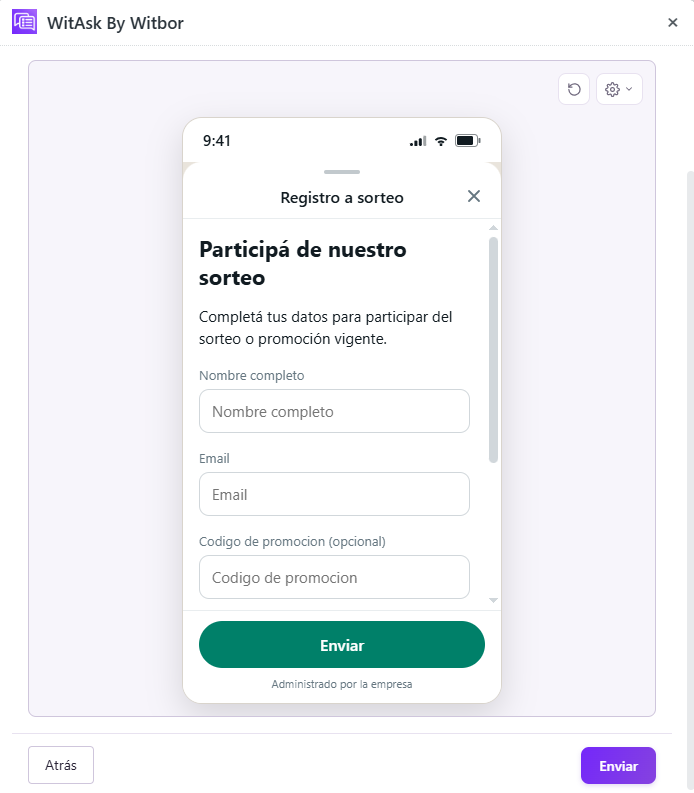
Someone wants to participate, but their details need to be recorded consistently. Marketing needs a name, email, promotion code, and a separate preference for future updates. Without a simple form, entries arrive in scattered messages and are hard to audit.
WitAsk organizes the first exchange so the team can move forward with the information it needs, without asking for the same details across separate messages.
What to ask
Three groups of details to move forward.
Full name and contact email.
Code used to validate the entry.
How they heard about it and whether they want updates.
The workflow
From the first message to a request ready for review.
- Initial message
The person enters through WhatsApp or a social media link.
- Guided questions
WitAsk collects personal details, code, and contact preferences.
- Entry list
Marketing receives a list ready to audit before the draw.
Resulting ticket
What the received information could look like.
- Full name
- Camila Torres
- camila.t@mail.com
- Promotion code
- VERANO24
- How they heard about it
- Accepts updates
- Yes
- Next step
- Validate entry
The fields and destination of the answer depend on the customer's configuration.
Adaptation
One use case can take different paths.
Request a receipt or invoice number.
Show the closing date in the form.
Verify that the person follows the account before confirming.
For marketing teams that need an organized, auditable participant list instead of scattered social media comments.