
Starting point
An inquiry that needs context.
Someone needs an appointment, but arranging it manually takes time. The team needs to know the type of consultation, preferred day and time window, and whether it will be in person or online. Without structured answers, scheduling takes several messages.
WitAsk organizes the first exchange so the team can move forward with the information it needs, without asking for the same details across separate messages.
What to ask
Three groups of details to move forward.
The service or consultation requested.
Preferred day and time window.
In-person or online appointment.
The workflow
From the first message to a request ready for review.
- Initial message
The person requests an appointment.
- Guided questions
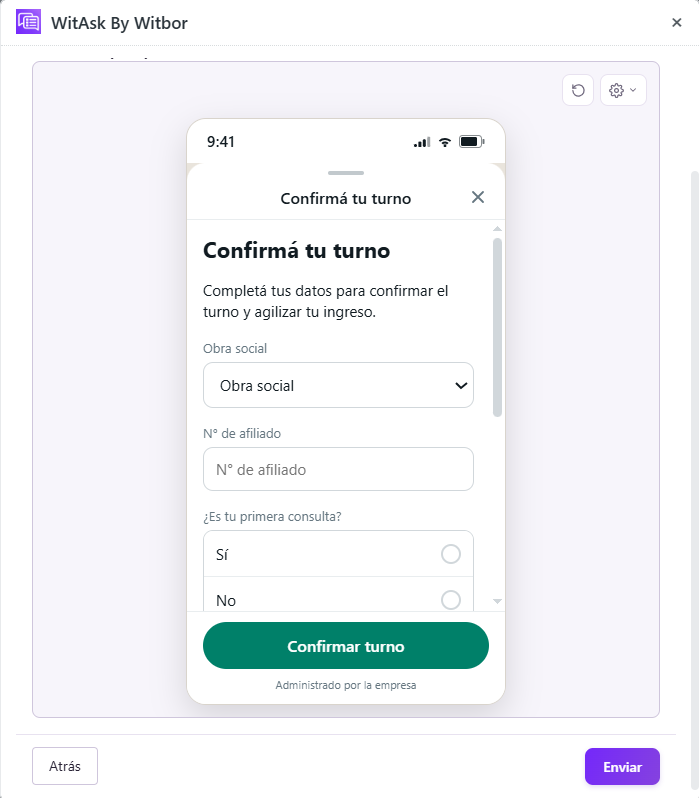
WitAsk uses a WhatsApp Flow to collect the appointment type, day, time, and format without taking the person out of WhatsApp.
- Appointment confirmation
The details arrive organized in Zendesk so the team can review the request and continue assigning the appointment.
Resulting ticket
What the received information could look like.
- Full name
- Martín Gómez
- Appointment type
- Admissions interview
- Preferred day
- Thursday
- Time window
- Morning
- Format
- In person
- Next step
- Confirm assigned appointment
The fields and next step depend on the customer's configuration.
Adaptation
One use case can take different paths.
Add the reason for the visit and insurance provider.
Let the person choose a preferred professional.
Ask for the existing appointment before requesting a new time.
For institutions, clinics, and sales teams that need to organize schedules before confirming a time.