
Logistics
Where this process begins.
The order is ready to ship, but the delivery time has not been agreed. Before dispatch, the team needs the customer's preferred day and time window, whether someone will be home, and useful directions for the driver. Coordinating this through separate messages can delay dispatch.
For logistics teams seeking fewer rescheduled or failed deliveries caused by poor coordination.
Process map
From the initial need to the team’s next step.
- A need arisesThe person needs to start a request or report what happened.
- Initial messageThe customer is contacted to arrange delivery.
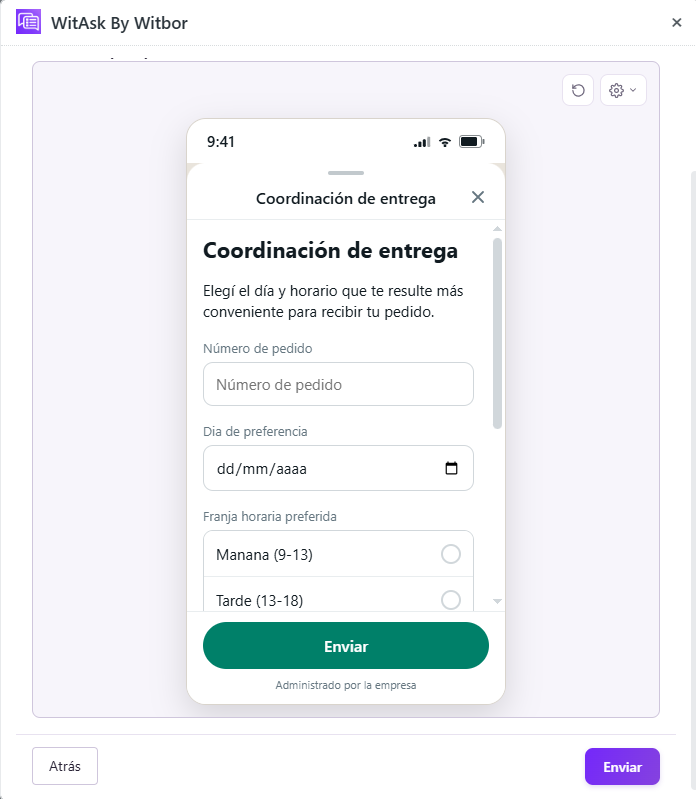
- Guided questionsThrough a WhatsApp Flow, WitAsk collects the day, time, availability, and directions for the delivery.
- Route planningThe confirmed information reaches Zendesk so the logistics team can continue scheduling the delivery.
Industry details
What the team needs to know.
Order number.
Preferred day and time window.
Whether someone will be home and a location reference.
Case follow-up
The information arrives ready for action.
A pending delivery becomes an agreed delivery window without repeated calls. The answers are gathered so the responsible team can review the case and decide what to do next.
The fields and next step depend on the customer's configuration.
Other situations
Ways to adapt the workflow.
Ask for an exact time instead of a window.
Give more weight to location directions.
Save the preferred day and time to avoid asking again.
Featured case in action
An example of the complete workflow.
- Initial message
The customer is contacted to arrange delivery.
- Guided questions
Through a WhatsApp Flow, WitAsk collects the day, time, availability, and directions for the delivery.
- Route planning
The confirmed information reaches Zendesk so the logistics team can continue scheduling the delivery.
- Order no.
- 39871
- Preferred day
- Wednesday
- Time window
- Afternoon
- Someone at the address?
- Yes
- Directions
- Black gate, doorbell 2
- Next step
- Confirm the route
The fields and next step depend on the customer's configuration.